
System design interviews · Pour candidates
An AI system design interview assistant for when your mind goes blank.
Pick Technical interview before the call. InterviewAssist keeps the challenge in view, suggests the clarifying questions to ask first, writes the design with the data flow step by step, and draws the architecture so you can sketch it yourself.
- Gratuit pour commencer
- Aucune carte bancaire requise
- Fonctionne dans votre navigateur · Apps Mac et Windows
Offers landed
Our users receive offers from the following companies

Questions sur Starts with
When you get the challenge, What to say next lists the clarifying questions to ask and the assumptions to design for.
The flow, step by step
Every design answer includes the data flow: which endpoint is called, which record changes, and what the client does next.
A diagram à copy
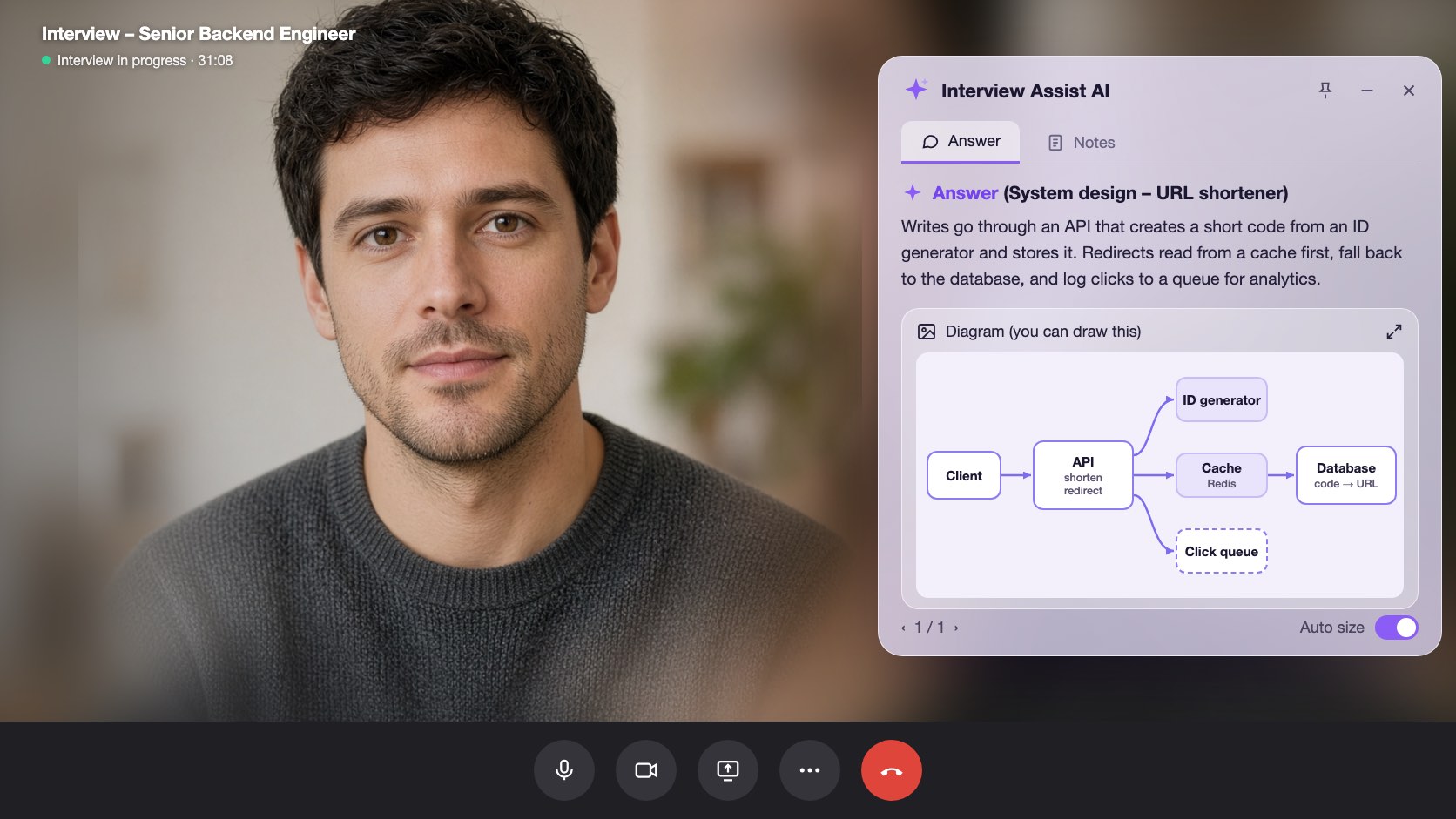
Generate diagram draws the high-level architecture. Zoom in, then sketch it in Excalidraw, Miro, or on the whiteboard.
Fonctionnalités
Ce que fait system design interviews
Toutes les fonctionnalités ci-dessous sont incluses dans chaque abonnement et utilisent le même CV, la même offre d’emploi et les mêmes situations déjà ajoutés.
01
Clarifying questions first
Scale, file sizes, latency, and consistency: the questions that set up the design, plus an Assuming line you can say out loud when the interviewer leaves it to you.
Clarify requirements
Que dire ensuiteDemander
Do listeners need it right away?
Assuming
Files up to 200 MB, about 1M uploads a day
02
A design answer in a fixed shape
Clarify requirements, high-level design, data flow, core components, scaling and reliability, trade-offs, and likely follow-ups, always in that order so you know where to look.
Data flow
Step by step1
POST /uploads: record created (status: pending)
2
Client PUTs the file to object storage
3
POST /uploads/{id}/complete: job queued
03
Generate diagram
One click draws the architecture of the system being discussed, from the challenge, your screen scans, or the conversation. Zoom in and out to read it.
Generate diagram
Zoom 100%Boxes
Client, API, Upload DB, Object storage, Queue, Worker
Use it
Copy it onto the whiteboard in your own words
Également inclus
The challenge stays in view
Paste the challenge, or let the copilot hear it on the call. It stays in context for every answer, even an hour into the round.
Scan screen memory
Scan a prompt from a shared doc or whiteboard. The text is kept for later answers, so the copilot still knows the challenge after the conversation moves on.
Que dire ensuite
Stuck mid-design? Get the next step to explain or the next question to ask, based on what was just discussed.
Essayez system design interviews dans votre navigateur
Un aperçu interactif avec des données d’exemple. Aucune de vos actions ici n’est enregistrée.
 InterviewAssist · System design roundÉcoute en cours24:17Vue mini


Transcription
Challenge
Design a service where users upload audio files.
Heard on the call. You can also paste it or scan it from the screen. Every answer and What to say next see it.
1 / 4 · Technical interview: the challenge
Pick Technical interview before you start. The copilot keeps the challenge in view, whether you heard it on the call, pasted it, or scanned it from the screen.
Fonctionnement
Comment utiliser system design interviews
- 1
Choose Technical interview
On the interview page, set Interview type to Technical interview before you start.
- 2
Add the challenge
Paste it, scan it from the screen, or let the interviewer read it out.
- 3
Ask, then design
Open What to say next for the clarifying questions, then press Space for the design answer.
- 4
Draw it
Click Generate diagram and copy the architecture onto the whiteboard.
Pensé pour les moments décisifs
- File upload and storage services
- URL shorteners
- Chat and notification systems
- News feeds and timelines
- Payment and order flows
- Rate limiters and caches
System design interviews : InterviewAssist face à la concurrence
Ce qu’il vaut face aux outils que l’on essaie généralement en premier.
| Fonctionnalité | InterviewAssist | Chatbot IA généraliste | Application limitée à l’entraînement |
|---|---|---|---|
| Hears the challenge on the call | |||
| Clarifying questions before the design | Sur demande | Parfois | |
| Architecture diagram during the round | Sur demande |
FAQ
Questions sur System design interviews
Vous avez encore une question ? Contactez-nous
Can AI help in a system design interview?
Yes. InterviewAssist listens to the round and, in Technical interview mode, gives you clarifying questions, a design answer with the data flow step by step, and an architecture diagram. You still explain the design in your own words.
How does it know what system I am designing?
From the challenge you paste, from screen scans, or from the call itself. If nothing names a system yet, Generate diagram says there is not enough to draw.
Does it draw system design diagrams?
Yes. Generate diagram draws one high-level architecture diagram you can zoom in on. It is a reference for sketching in your own tool, such as Excalidraw, Miro, or a whiteboard.
Which system design questions does it handle?
Any prompt the interviewer gives, such as an upload service, a URL shortener, chat, a news feed, payments, or a rate limiter. Answers follow the same sections every time.
How is this different from the coding interview copilot?
Coding rounds get the approach, complexity, and code. Technical interview mode is built for design rounds: requirements, data flow, components, trade-offs, and a diagram.
Does it work in the desktop app?
Yes. The Interview type picker is on the interview page in the web app and in the Mac and Windows apps.
Fonctionnalités associées
Candidats
Entretiens de code
Obtenez l’approche, la complexité et le code fonctionnel en temps réel pour les questions de code, depuis l’appel ou votre écran. Aussi pour la conception système.
Lire la suiteCandidats
Copilot en direct
Des réponses solides à chaque question, en temps réel, avec des conseils de coaching pendant l’entretien. Compatible Zoom, Meet, Teams et téléphone.
Lire la suiteCandidats
Entretiens d’entraînement
Entraînez-vous avec un recruteur IA adapté au poste visé. Répondez à l’oral, obtenez une note pour chaque réponse et voyez quoi améliorer.
Lire la suiteTout le monde
Application web
Fonctionne dans Chrome ou Edge, sans installation. Partagez l’onglet de votre appel ou utilisez votre micro pour obtenir des réponses en temps réel. Aussi sur Mac et Windows.
Lire la suiteArrivez prêt à votre prochain entretien.
Ajoutez votre CV et l’offre d’emploi, lancez un entretien d’entraînement, puis gardez le Copilot en direct à côté de votre appel. La configuration prend environ cinq minutes.
Démarrage gratuit · Aucune carte bancaire requise