
System design interviews · candidates용
An AI system design interview assistant for when your mind goes blank.
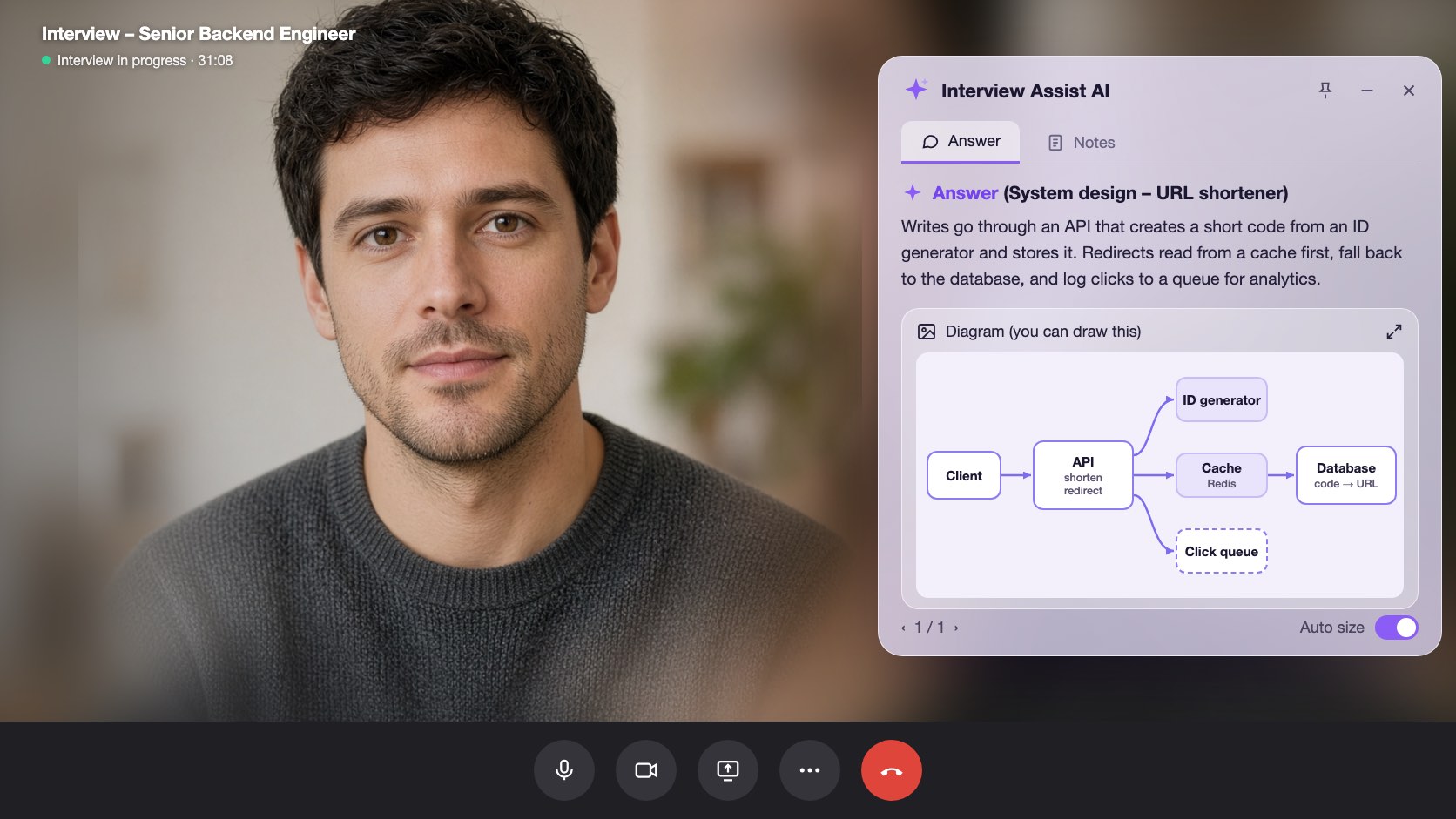
Pick Technical interview before the call. InterviewAssist keeps the challenge in view, suggests the clarifying questions to ask first, writes the design with the data flow step by step, and draws the architecture so you can sketch it yourself.
- 무료로 시작
- 신용카드 없이 시작
- 브라우저에서 실행 · Mac & Windows 앱
Offers landed
Our users receive offers from the following companies

Starts with 자주 묻는 질문
When you get the challenge, What to say next lists the clarifying questions to ask and the assumptions to design for.
The flow, step by step
Every design answer includes the data flow: which endpoint is called, which record changes, and what the client does next.
A diagram~copy
Generate diagram draws the high-level architecture. Zoom in, then sketch it in Excalidraw, Miro, or on the whiteboard.
주요 기능
system design interviews로 할 수 있는 일
아래 기능은 모든 요금제에 포함되어 있으며, 이미 추가한 이력서, 채용 공고, 스토리를 그대로 활용해요.
01
Clarifying questions first
Scale, file sizes, latency, and consistency: the questions that set up the design, plus an Assuming line you can say out loud when the interviewer leaves it to you.
Clarify requirements
다음에 할 말까지질문
Do listeners need it right away?
Assuming
Files up to 200 MB, about 1M uploads a day
02
A design answer in a fixed shape
Clarify requirements, high-level design, data flow, core components, scaling and reliability, trade-offs, and likely follow-ups, always in that order so you know where to look.
Data flow
Step by step1
POST /uploads: record created (status: pending)
2
Client PUTs the file to object storage
3
POST /uploads/{id}/complete: job queued
03
Generate diagram
One click draws the architecture of the system being discussed, from the challenge, your screen scans, or the conversation. Zoom in and out to read it.
Generate diagram
Zoom 100%Boxes
Client, API, Upload DB, Object storage, Queue, Worker
Use it
Copy it onto the whiteboard in your own words
함께 제공되는 기능
The challenge stays in view
Paste the challenge, or let the copilot hear it on the call. It stays in context for every answer, even an hour into the round.
Scan screen memory
Scan a prompt from a shared doc or whiteboard. The text is kept for later answers, so the copilot still knows the challenge after the conversation moves on.
다음에 할 말까지
Stuck mid-design? Get the next step to explain or the next question to ask, based on what was just discussed.
브라우저에서 system design interviews 체험하기
샘플 데이터로 살펴보는 인터랙티브 미리보기예요. 여기서 클릭한 내용은 저장되지 않아요.
 InterviewAssist · System design round듣는 중24:17미니 보기


대화 기록
Challenge
Design a service where users upload audio files.
Heard on the call. You can also paste it or scan it from the screen. Every answer and What to say next see it.
1 / 4 · Technical interview: the challenge
Pick Technical interview before you start. The copilot keeps the challenge in view, whether you heard it on the call, pasted it, or scanned it from the screen.
이용 방법
system design interviews 사용 방법
- 1
Choose Technical interview
On the interview page, set Interview type to Technical interview before you start.
- 2
Add the challenge
Paste it, scan it from the screen, or let the interviewer read it out.
- 3
Ask, then design
Open What to say next for the clarifying questions, then press Space for the design answer.
- 4
Draw it
Click Generate diagram and copy the architecture onto the whiteboard.
중요한 순간을 위해 설계했어요
- File upload and storage services
- URL shorteners
- Chat and notification systems
- News feeds and timelines
- Payment and order flows
- Rate limiters and caches
System design interviews: InterviewAssist 비교
많은 분들이 먼저 써보는 도구들과 어떻게 다른지 비교해보세요.
| 기능 | InterviewAssist | 일반 AI 챗봇 | 연습 전용 준비 앱 |
|---|---|---|---|
| Hears the challenge on the call | |||
| Clarifying questions before the design | 프롬프트를 넣으면 가능 | 일부 가능 | |
| Architecture diagram during the round | 프롬프트를 넣으면 가능 |
FAQ
System design interviews 자주 묻는 질문
궁금한 점이 더 있으신가요? 문의하기
Can AI help in a system design interview?
Yes. InterviewAssist listens to the round and, in Technical interview mode, gives you clarifying questions, a design answer with the data flow step by step, and an architecture diagram. You still explain the design in your own words.
How does it know what system I am designing?
From the challenge you paste, from screen scans, or from the call itself. If nothing names a system yet, Generate diagram says there is not enough to draw.
Does it draw system design diagrams?
Yes. Generate diagram draws one high-level architecture diagram you can zoom in on. It is a reference for sketching in your own tool, such as Excalidraw, Miro, or a whiteboard.
Which system design questions does it handle?
Any prompt the interviewer gives, such as an upload service, a URL shortener, chat, a news feed, payments, or a rate limiter. Answers follow the same sections every time.
How is this different from the coding interview copilot?
Coding rounds get the approach, complexity, and code. Technical interview mode is built for design rounds: requirements, data flow, components, trade-offs, and a diagram.
Does it work in the desktop app?
Yes. The Interview type picker is on the interview page in the web app and in the Mac and Windows apps.
관련 기능
지원자
코딩 면접
통화나 화면에서 코딩 질문을 파악해 접근 방식, 복잡도, 실행 코드를 실시간으로 받아보세요. 시스템 설계 면접도 지원해요.
자세히 보기지원자
라이브 Copilot
모든 면접 질문에 바로 쓸 수 있는 답변과 실시간 코칭 팁을 받아보세요. Zoom, Meet, Teams, 전화 면접까지 지원해요.
자세히 보기지원자
모의 면접
지원하려는 직무에 맞춘 AI 면접관과 연습하세요. 답변을 말하고, 각 답변의 점수와 고칠 점을 바로 확인할 수 있어요.
자세히 보기모든 사용자
웹 앱
설치 없이 Chrome 또는 Edge에서 실행돼요. 통화 탭을 공유하거나 마이크를 사용해 실시간 면접 답변을 받아보세요. Mac과 Windows도 지원해요.
자세히 보기다음 면접, 준비된 상태로 들어가세요.
이력서와 채용 공고를 추가하고, 모의 면접을 진행한 뒤 통화 옆에 라이브 Copilot을 띄워두세요. 설정은 약 5분이면 끝나요.
무료로 시작 · 신용카드 필요 없음