
System design interviews · Para candidates
An AI system design interview assistant for when your mind goes blank.
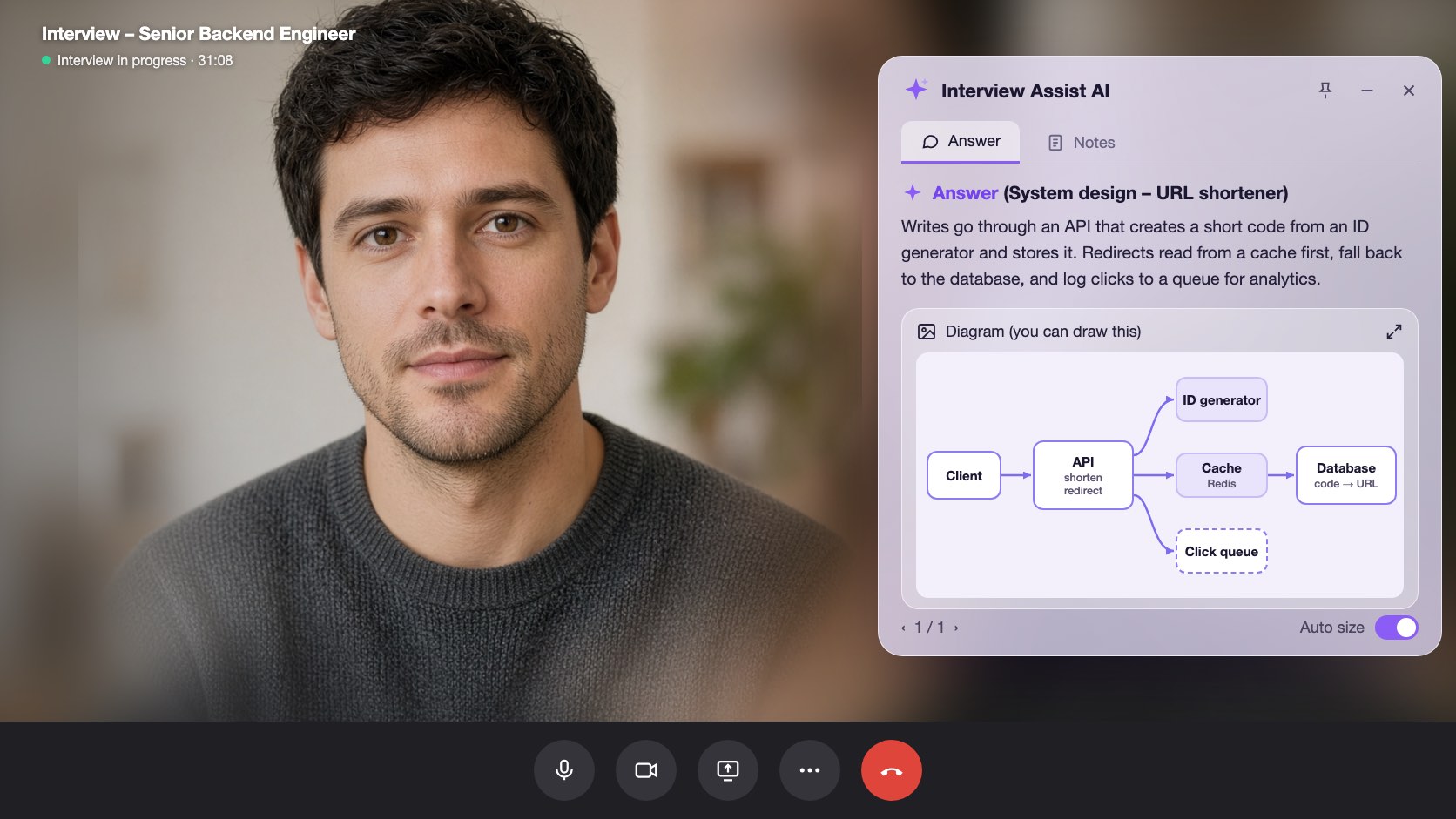
Pick Technical interview before the call. InterviewAssist keeps the challenge in view, suggests the clarifying questions to ask first, writes the design with the data flow step by step, and draws the architecture so you can sketch it yourself.
- Grátis para começar
- Não precisa de cartão de crédito
- Roda no navegador · Apps para Mac e Windows
Offers landed
Our users receive offers from the following companies

Perguntas sobre Starts with
When you get the challenge, What to say next lists the clarifying questions to ask and the assumptions to design for.
The flow, step by step
Every design answer includes the data flow: which endpoint is called, which record changes, and what the client does next.
A diagram a copy
Generate diagram draws the high-level architecture. Zoom in, then sketch it in Excalidraw, Miro, or on the whiteboard.
Recursos
O que o system design interviews faz
Todos os recursos abaixo estão incluídos em todos os planos e funcionam com o mesmo currículo, descrição da vaga e histórias que você já adicionou.
01
Clarifying questions first
Scale, file sizes, latency, and consistency: the questions that set up the design, plus an Assuming line you can say out loud when the interviewer leaves it to you.
Clarify requirements
O que dizer em seguidaPerguntar
Do listeners need it right away?
Assuming
Files up to 200 MB, about 1M uploads a day
02
A design answer in a fixed shape
Clarify requirements, high-level design, data flow, core components, scaling and reliability, trade-offs, and likely follow-ups, always in that order so you know where to look.
Data flow
Step by step1
POST /uploads: record created (status: pending)
2
Client PUTs the file to object storage
3
POST /uploads/{id}/complete: job queued
03
Generate diagram
One click draws the architecture of the system being discussed, from the challenge, your screen scans, or the conversation. Zoom in and out to read it.
Generate diagram
Zoom 100%Boxes
Client, API, Upload DB, Object storage, Queue, Worker
Use it
Copy it onto the whiteboard in your own words
Também incluído
The challenge stays in view
Paste the challenge, or let the copilot hear it on the call. It stays in context for every answer, even an hour into the round.
Scan screen memory
Scan a prompt from a shared doc or whiteboard. The text is kept for later answers, so the copilot still knows the challenge after the conversation moves on.
O que dizer em seguida
Stuck mid-design? Get the next step to explain or the next question to ask, based on what was just discussed.
Teste o system design interviews no navegador
Uma prévia interativa com dados de exemplo. Nada do que você clicar aqui será salvo.
 InterviewAssist · System design roundOuvindo24:17Visão mini


Transcrição
Challenge
Design a service where users upload audio files.
Heard on the call. You can also paste it or scan it from the screen. Every answer and What to say next see it.
1 / 4 · Technical interview: the challenge
Pick Technical interview before you start. The copilot keeps the challenge in view, whether you heard it on the call, pasted it, or scanned it from the screen.
Como funciona
Como usar o system design interviews
- 1
Choose Technical interview
On the interview page, set Interview type to Technical interview before you start.
- 2
Add the challenge
Paste it, scan it from the screen, or let the interviewer read it out.
- 3
Ask, then design
Open What to say next for the clarifying questions, then press Space for the design answer.
- 4
Draw it
Click Generate diagram and copy the architecture onto the whiteboard.
Feito para os momentos que importam
- File upload and storage services
- URL shorteners
- Chat and notification systems
- News feeds and timelines
- Payment and order flows
- Rate limiters and caches
System design interviews: comparativo do InterviewAssist
Veja como ele se compara às ferramentas que as pessoas costumam testar primeiro.
| Recurso | InterviewAssist | Chatbot de IA genérico | App só para treinar |
|---|---|---|---|
| Hears the challenge on the call | |||
| Clarifying questions before the design | Se você pedir | Às vezes | |
| Architecture diagram during the round | Se você pedir |
FAQ
Perguntas sobre System design interviews
Ainda ficou com alguma dúvida? Fale com a gente
Can AI help in a system design interview?
Yes. InterviewAssist listens to the round and, in Technical interview mode, gives you clarifying questions, a design answer with the data flow step by step, and an architecture diagram. You still explain the design in your own words.
How does it know what system I am designing?
From the challenge you paste, from screen scans, or from the call itself. If nothing names a system yet, Generate diagram says there is not enough to draw.
Does it draw system design diagrams?
Yes. Generate diagram draws one high-level architecture diagram you can zoom in on. It is a reference for sketching in your own tool, such as Excalidraw, Miro, or a whiteboard.
Which system design questions does it handle?
Any prompt the interviewer gives, such as an upload service, a URL shortener, chat, a news feed, payments, or a rate limiter. Answers follow the same sections every time.
How is this different from the coding interview copilot?
Coding rounds get the approach, complexity, and code. Technical interview mode is built for design rounds: requirements, data flow, components, trade-offs, and a diagram.
Does it work in the desktop app?
Yes. The Interview type picker is on the interview page in the web app and in the Mac and Windows apps.
Recursos relacionados
Candidatos
Entrevistas de programação
Receba abordagem, complexidade e código funcional para perguntas de programação em tempo real, pela chamada ou pela tela. Também para system design.
Ler maisCandidatos
Copilot ao vivo
Receba uma ótima resposta para cada pergunta da entrevista em tempo real, com dicas ao vivo. Funciona com Zoom, Meet, Teams e ligações.
Ler maisCandidatos
Simulações de entrevista
Treine com um entrevistador de IA feito para a vaga que você quer. Responda em voz alta, receba nota em cada resposta e veja o que melhorar.
Ler maisTodo mundo
App web
Roda no Chrome ou Edge sem instalar nada. Compartilhe a aba da chamada ou use o microfone e receba respostas em tempo real. Também no Mac e Windows.
Ler maisChegue preparado à sua próxima entrevista.
Adicione seu currículo e a descrição da vaga, faça uma simulação de entrevista e deixe o Copilot ao vivo ao lado da chamada. A configuração leva cerca de cinco minutos.
Grátis para começar · Não precisa de cartão de crédito