
System design interviews · สำหรับ candidates
An AI system design interview assistant for when your mind goes blank.
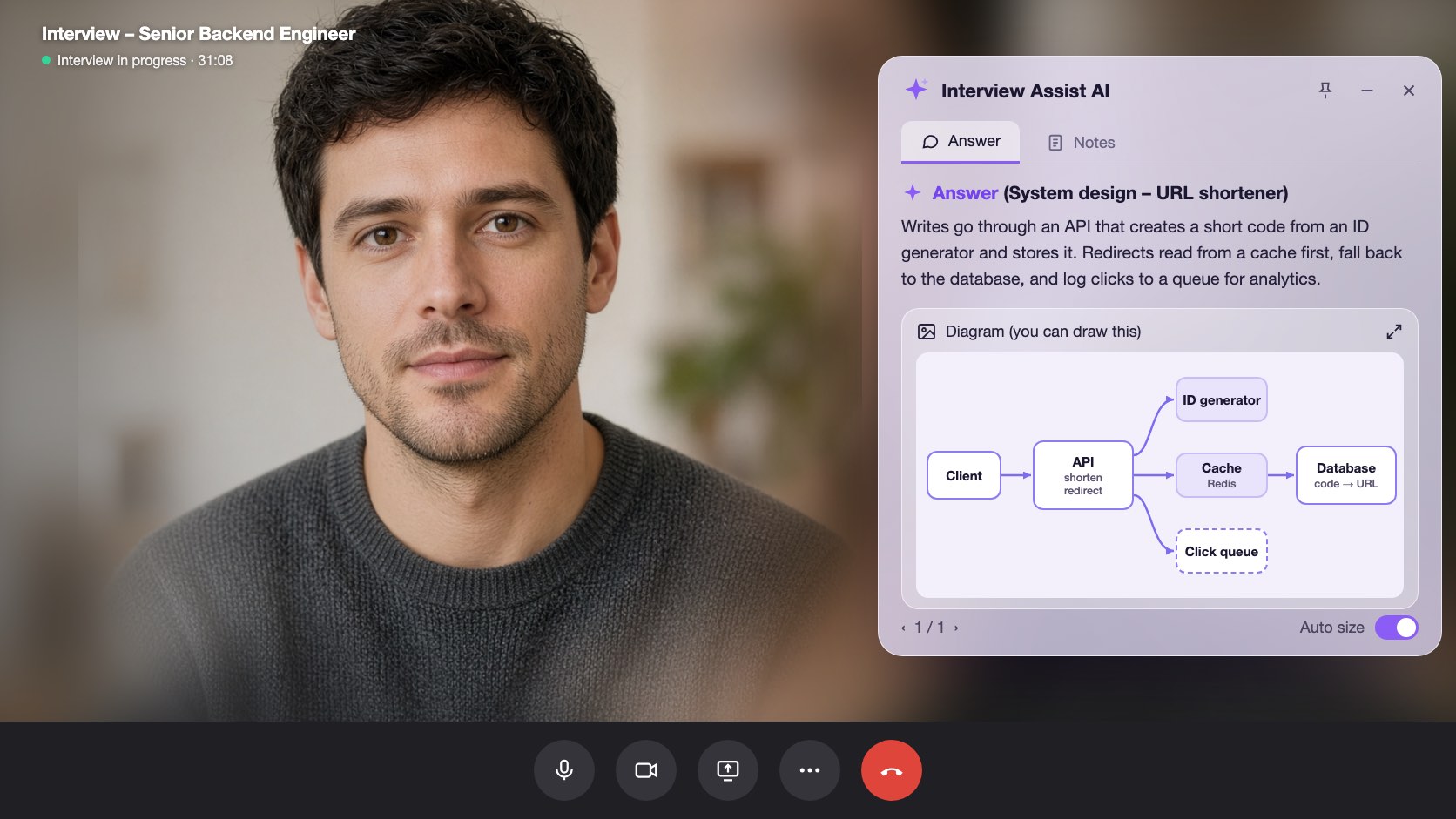
Pick Technical interview before the call. InterviewAssist keeps the challenge in view, suggests the clarifying questions to ask first, writes the design with the data flow step by step, and draws the architecture so you can sketch it yourself.
- เริ่มใช้ฟรี
- ไม่ต้องใช้บัตรเครดิต
- ใช้งานบนเบราว์เซอร์ · มีแอปสำหรับ Mac และ Windows
Offers landed
Our users receive offers from the following companies

คำถามเกี่ยวกับ Starts with
When you get the challenge, What to say next lists the clarifying questions to ask and the assumptions to design for.
The flow, step by step
Every design answer includes the data flow: which endpoint is called, which record changes, and what the client does next.
A diagram ถึง copy
Generate diagram draws the high-level architecture. Zoom in, then sketch it in Excalidraw, Miro, or on the whiteboard.
ความสามารถ
system design interviews ทำอะไรได้บ้าง
ทุกความสามารถด้านล่างมีให้ครบในทุกแพ็กเกจ และใช้ร่วมกับเรซูเม่ ประกาศรับสมัครงาน และเรื่องเล่าที่คุณเพิ่มไว้แล้วได้ทันที
01
Clarifying questions first
Scale, file sizes, latency, and consistency: the questions that set up the design, plus an Assuming line you can say out loud when the interviewer leaves it to you.
Clarify requirements
ต่อไปควรพูดอะไรถามว่า
Do listeners need it right away?
Assuming
Files up to 200 MB, about 1M uploads a day
02
A design answer in a fixed shape
Clarify requirements, high-level design, data flow, core components, scaling and reliability, trade-offs, and likely follow-ups, always in that order so you know where to look.
Data flow
Step by step1
POST /uploads: record created (status: pending)
2
Client PUTs the file to object storage
3
POST /uploads/{id}/complete: job queued
03
Generate diagram
One click draws the architecture of the system being discussed, from the challenge, your screen scans, or the conversation. Zoom in and out to read it.
Generate diagram
Zoom 100%Boxes
Client, API, Upload DB, Object storage, Queue, Worker
Use it
Copy it onto the whiteboard in your own words
มีให้ด้วย
The challenge stays in view
Paste the challenge, or let the copilot hear it on the call. It stays in context for every answer, even an hour into the round.
Scan screen memory
Scan a prompt from a shared doc or whiteboard. The text is kept for later answers, so the copilot still knows the challenge after the conversation moves on.
ต่อไปควรพูดอะไร
Stuck mid-design? Get the next step to explain or the next question to ask, based on what was just discussed.
ลองใช้ system design interviews บนเบราว์เซอร์
พรีวิวแบบโต้ตอบได้พร้อมข้อมูลตัวอย่าง คลิกอะไรตรงนี้ก็ไม่ถูกบันทึก
 InterviewAssist · System design roundกำลังฟัง24:17มุมมองย่อ


บันทึกถอดเสียง
Challenge
Design a service where users upload audio files.
Heard on the call. You can also paste it or scan it from the screen. Every answer and What to say next see it.
1 / 4 · Technical interview: the challenge
Pick Technical interview before you start. The copilot keeps the challenge in view, whether you heard it on the call, pasted it, or scanned it from the screen.
วิธีการทำงาน
วิธีใช้ system design interviews
- 1
Choose Technical interview
On the interview page, set Interview type to Technical interview before you start.
- 2
Add the challenge
Paste it, scan it from the screen, or let the interviewer read it out.
- 3
Ask, then design
Open What to say next for the clarifying questions, then press Space for the design answer.
- 4
Draw it
Click Generate diagram and copy the architecture onto the whiteboard.
สร้างมาเพื่อช่วงเวลาสำคัญในการสัมภาษณ์
- File upload and storage services
- URL shorteners
- Chat and notification systems
- News feeds and timelines
- Payment and order flows
- Rate limiters and caches
เปรียบเทียบ System design interviews กับ InterviewAssist
ดูว่าเทียบกับเครื่องมือที่คนมักลองใช้ก่อนแล้วเป็นอย่างไร
| ความสามารถ | InterviewAssist | AI chatbot ทั่วไป | แอปเตรียมตัวแบบซ้อมอย่างเดียว |
|---|---|---|---|
| Hears the challenge on the call | |||
| Clarifying questions before the design | ต้องป้อนโจทย์ก่อน | มีบ้างบางครั้ง | |
| Architecture diagram during the round | ต้องป้อนโจทย์ก่อน |
FAQ
คำถามเกี่ยวกับ System design interviews
ยังมีคำถามอยู่ไหม? ติดต่อเรา
Can AI help in a system design interview?
Yes. InterviewAssist listens to the round and, in Technical interview mode, gives you clarifying questions, a design answer with the data flow step by step, and an architecture diagram. You still explain the design in your own words.
How does it know what system I am designing?
From the challenge you paste, from screen scans, or from the call itself. If nothing names a system yet, Generate diagram says there is not enough to draw.
Does it draw system design diagrams?
Yes. Generate diagram draws one high-level architecture diagram you can zoom in on. It is a reference for sketching in your own tool, such as Excalidraw, Miro, or a whiteboard.
Which system design questions does it handle?
Any prompt the interviewer gives, such as an upload service, a URL shortener, chat, a news feed, payments, or a rate limiter. Answers follow the same sections every time.
How is this different from the coding interview copilot?
Coding rounds get the approach, complexity, and code. Technical interview mode is built for design rounds: requirements, data flow, components, trade-offs, and a diagram.
Does it work in the desktop app?
Yes. The Interview type picker is on the interview page in the web app and in the Mac and Windows apps.
ฟีเจอร์ที่เกี่ยวข้อง
ผู้สมัคร
สัมภาษณ์เขียนโค้ด
ได้แนวทาง ความซับซ้อน และโค้ดที่ใช้งานได้สำหรับคำถามเขียนโค้ดแบบเรียลไทม์ จากเสียงในสายหรือหน้าจอ รวมถึงรอบ System Design
อ่านต่อผู้สมัคร
Live Copilot
ได้คำตอบดี ๆ สำหรับทุกคำถามสัมภาษณ์แบบเรียลไทม์ พร้อมคำแนะนำระหว่างคุย ใช้ได้กับ Zoom, Meet, Teams และโทรศัพท์
อ่านต่อผู้สมัคร
ซ้อมสัมภาษณ์งาน
ซ้อมกับผู้สัมภาษณ์ AI ที่ปรับให้ตรงกับงานที่คุณอยากได้ ตอบด้วยเสียงจริง รับคะแนนทีละข้อ และรู้ชัดว่าต้องแก้ตรงไหน
อ่านต่อทุกคน
เว็บแอป
ใช้ได้บน Chrome หรือ Edge ไม่ต้องติดตั้ง แชร์แท็บคอลหรือใช้ไมค์เพื่อรับคำตอบสัมภาษณ์แบบเรียลไทม์ ใช้ได้บน Mac และ Windows ด้วย
อ่านต่อเข้าห้องสัมภาษณ์ครั้งต่อไปแบบพร้อมกว่าเดิม
เพิ่มเรซูเม่และประกาศรับสมัครงาน ซ้อมสัมภาษณ์งาน แล้วเปิด Live Copilot ไว้ข้างสายสัมภาษณ์ ตั้งค่าใช้เวลาประมาณ 5 นาที
เริ่มใช้งานฟรี · ไม่ต้องใช้บัตรเครดิต