
System design interviews · 適合candidates
An AI system design interview assistant for when your mind goes blank.
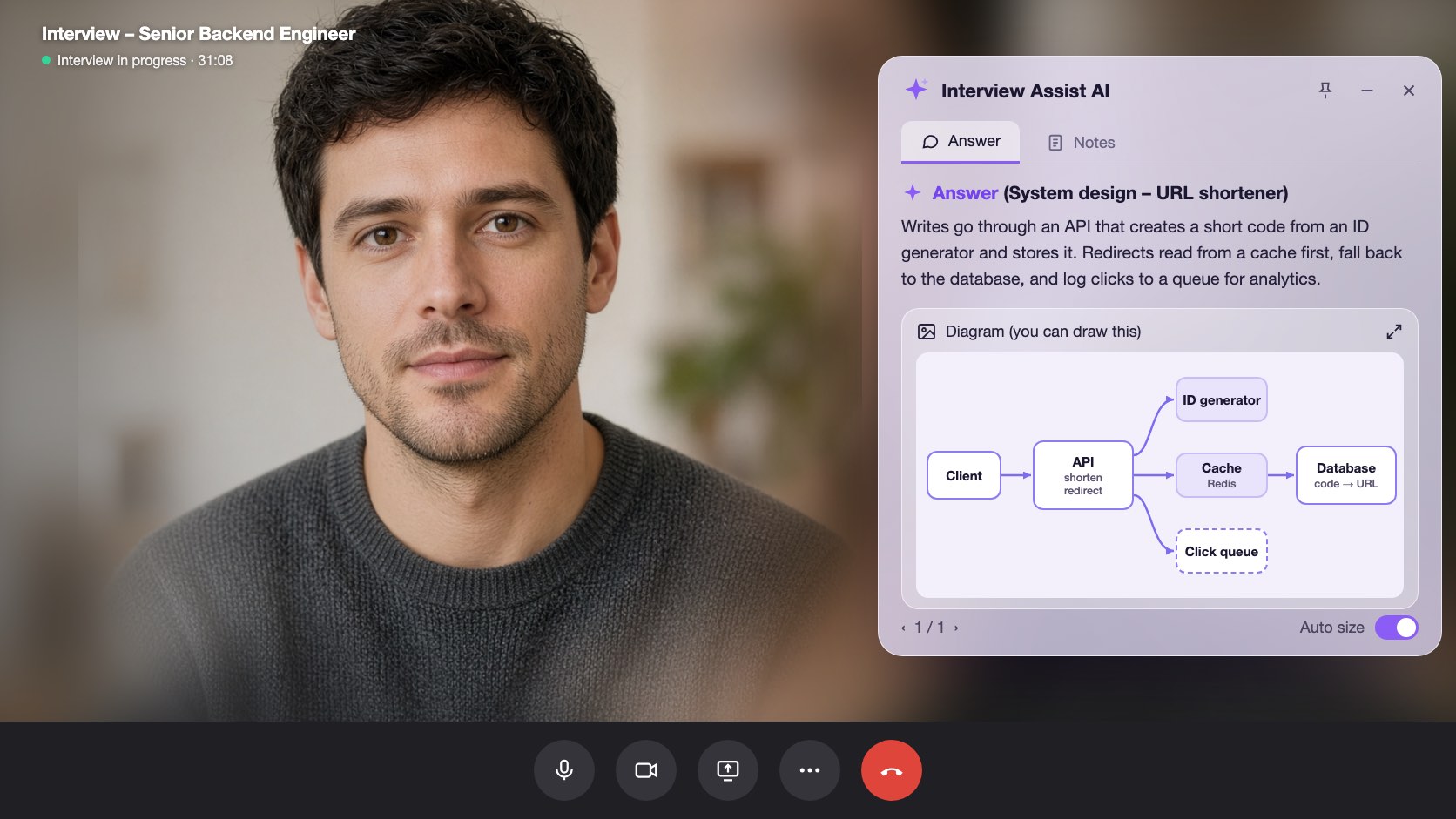
Pick Technical interview before the call. InterviewAssist keeps the challenge in view, suggests the clarifying questions to ask first, writes the design with the data flow step by step, and draws the architecture so you can sketch it yourself.
- 可免費開始使用
- 免信用卡
- 可在瀏覽器使用 · 也有 Mac 與 Windows 應用程式
Offers landed
Our users receive offers from the following companies

Starts with常見問題
When you get the challenge, What to say next lists the clarifying questions to ask and the assumptions to design for.
The flow, step by step
Every design answer includes the data flow: which endpoint is called, which record changes, and what the client does next.
A diagram 到 copy
Generate diagram draws the high-level architecture. Zoom in, then sketch it in Excalidraw, Miro, or on the whiteboard.
功能亮點
system design interviews 能幫你做什麼
以下所有功能皆包含在每個方案中,並會沿用你已加入的履歷、職缺說明與故事。
01
Clarifying questions first
Scale, file sizes, latency, and consistency: the questions that set up the design, plus an Assuming line you can say out loud when the interviewer leaves it to you.
Clarify requirements
下一句該怎麼接可追問
Do listeners need it right away?
Assuming
Files up to 200 MB, about 1M uploads a day
02
A design answer in a fixed shape
Clarify requirements, high-level design, data flow, core components, scaling and reliability, trade-offs, and likely follow-ups, always in that order so you know where to look.
Data flow
Step by step1
POST /uploads: record created (status: pending)
2
Client PUTs the file to object storage
3
POST /uploads/{id}/complete: job queued
03
Generate diagram
One click draws the architecture of the system being discussed, from the challenge, your screen scans, or the conversation. Zoom in and out to read it.
Generate diagram
Zoom 100%Boxes
Client, API, Upload DB, Object storage, Queue, Worker
Use it
Copy it onto the whiteboard in your own words
同樣包含
The challenge stays in view
Paste the challenge, or let the copilot hear it on the call. It stays in context for every answer, even an hour into the round.
Scan screen memory
Scan a prompt from a shared doc or whiteboard. The text is kept for later answers, so the copilot still knows the challenge after the conversation moves on.
下一句該怎麼接
Stuck mid-design? Get the next step to explain or the next question to ask, based on what was just discussed.
直接在瀏覽器試用 system design interviews
使用範例資料的互動式預覽。你在這裡點選的任何內容都不會被儲存。
 InterviewAssist · System design round聆聽中24:17迷你檢視


逐字稿
Challenge
Design a service where users upload audio files.
Heard on the call. You can also paste it or scan it from the screen. Every answer and What to say next see it.
1 / 4 · Technical interview: the challenge
Pick Technical interview before you start. The copilot keeps the challenge in view, whether you heard it on the call, pasted it, or scanned it from the screen.
運作方式
如何使用 system design interviews
- 1
Choose Technical interview
On the interview page, set Interview type to Technical interview before you start.
- 2
Add the challenge
Paste it, scan it from the screen, or let the interviewer read it out.
- 3
Ask, then design
Open What to say next for the clarifying questions, then press Space for the design answer.
- 4
Draw it
Click Generate diagram and copy the architecture onto the whiteboard.
為關鍵時刻而設計
- File upload and storage services
- URL shorteners
- Chat and notification systems
- News feeds and timelines
- Payment and order flows
- Rate limiters and caches
System design interviews:InterviewAssist 功能比較
看看它和多數人一開始會嘗試的工具相比,差在哪裡。
| 功能 | InterviewAssist | 一般 AI 聊天機器人 | 只提供練習的準備工具 |
|---|---|---|---|
| Hears the challenge on the call | |||
| Clarifying questions before the design | 需要提示才會 | 有時支援 | |
| Architecture diagram during the round | 需要提示才會 |
常見問題
System design interviews常見問題
還有其他問題嗎? 聯絡我們
Can AI help in a system design interview?
Yes. InterviewAssist listens to the round and, in Technical interview mode, gives you clarifying questions, a design answer with the data flow step by step, and an architecture diagram. You still explain the design in your own words.
How does it know what system I am designing?
From the challenge you paste, from screen scans, or from the call itself. If nothing names a system yet, Generate diagram says there is not enough to draw.
Does it draw system design diagrams?
Yes. Generate diagram draws one high-level architecture diagram you can zoom in on. It is a reference for sketching in your own tool, such as Excalidraw, Miro, or a whiteboard.
Which system design questions does it handle?
Any prompt the interviewer gives, such as an upload service, a URL shortener, chat, a news feed, payments, or a rate limiter. Answers follow the same sections every time.
How is this different from the coding interview copilot?
Coding rounds get the approach, complexity, and code. Technical interview mode is built for design rounds: requirements, data flow, components, trade-offs, and a diagram.
Does it work in the desktop app?
Yes. The Interview type picker is on the interview page in the web app and in the Mac and Windows apps.
準備好再走進下一場面試。
加入你的履歷與職缺說明,先跑一場模擬面試,再把即時 Copilot 放在通話旁。大約五分鐘就能完成設定。
免費開始 · 無需信用卡